Best Affiliate Marketing ProgramsAmazon Affiliate Program: How to Join, Qualify and Get Paid
Amazon Affiliate Program: How to Join, Qualify and Get Paid
The short answer
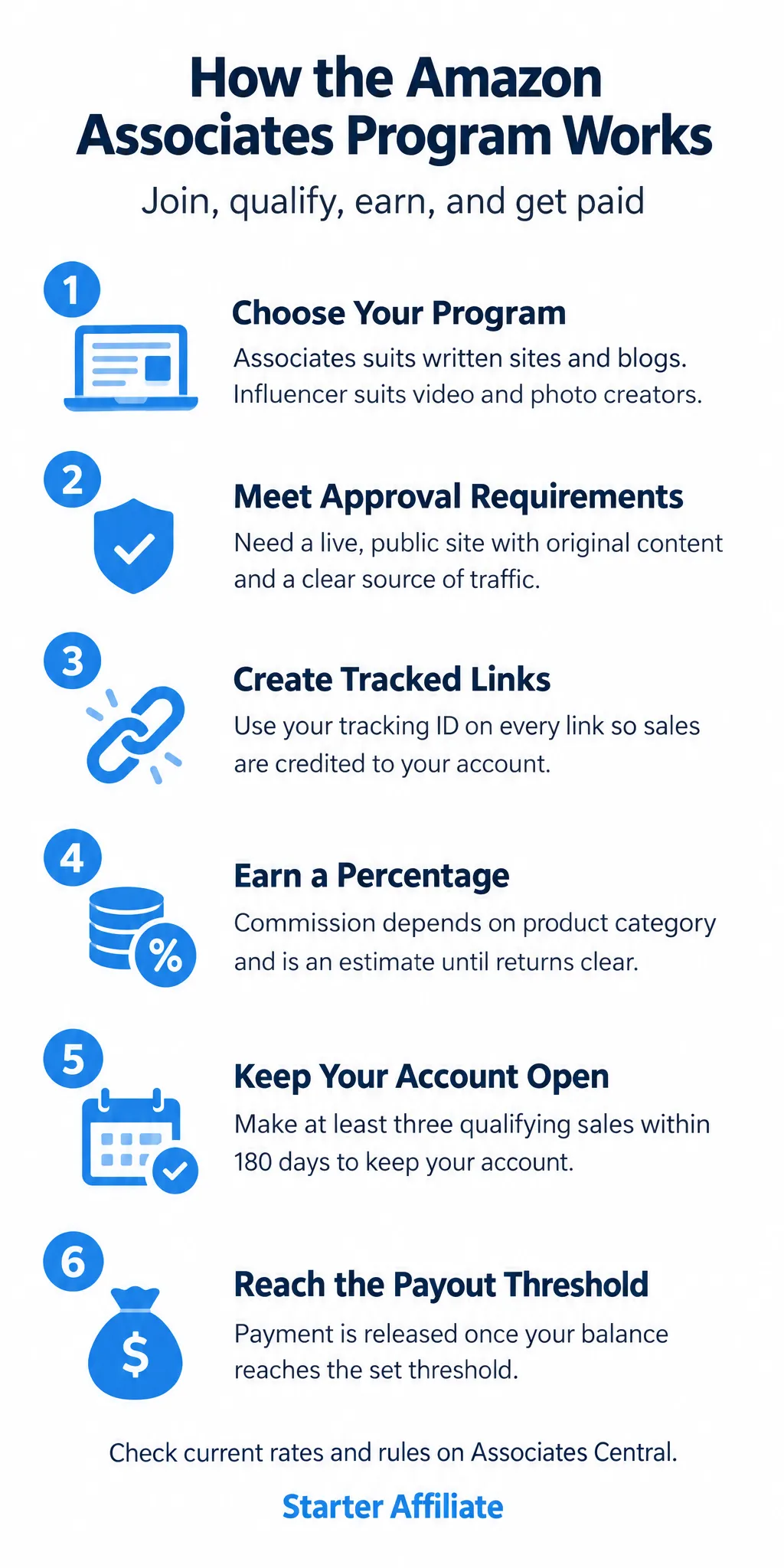
The Amazon Associates program lets you earn commissions by linking to Amazon products and earning a percentage of qualifying sales made through your links. To join, you need a website, app or YouTube channel with real content, a plan for driving traffic, and an account that Amazon approves. Once approved, you must make at least three qualifying sales within 180 days to keep your account open. Commission rates vary by product category, and you receive payment once your balance reaches a set threshold.
Some links on this site are affiliate links: if you buy through one, the site may earn a commission at no extra cost to you. More about this.
- Who can apply: what Amazon expects from a site or channel before it approves you
- How commissions work: why the rate depends on the product category, not a single flat figure
- The 180-day rule: how to avoid losing your account before you earn anything
- Payout thresholds: when your earnings are actually paid out, and what to do while you wait
- Common mistakes: the errors that get applications rejected or accounts closed
If you have ever read a list of affiliate programs and felt no closer to choosing one, you are not alone. Most guides mix up the join process, the pay structure and the payout rules, so it is hard to tell what applies to you. The Amazon program is a common first choice, but its rules are specific, and a small misunderstanding can cost you your account.
This article gives you a clearer path. You will see what Amazon checks before it approves an application, how commissions are calculated, and why the 180-day rule matters more than most beginners expect. It also covers when payment is released, so you know what to expect before your first check.
Each step is set out in order, so you can work through it on your own site or channel. By the end, you should be able to decide whether this program fits your situation and know exactly what to do next.
What the Amazon Associates Program Is
The Amazon Associates program is Amazon's affiliate program. It lets you earn money by recommending products from Amazon's store. You don't sell anything yourself. You send people to Amazon, and if they buy, you get a share of the sale.
Here is how it works in plain terms:
- You sign up and get a unique affiliate link.
- You place that link in your content, such as a blog post, video, or social post.
- When someone clicks the link, Amazon tracks the visit using a cookie on their device.
- If they buy something within the tracking window, you earn a commission on qualifying purchases.
Your earnings come from a percentage of qualifying sales, not from a fixed fee. A bigger order usually means a bigger commission, and a sale of a product in a category that pays a lower rate earns less. Amazon sets these rates and can change them, so check the current terms before you plan around any number.
Which Amazon program fits how I create content?
Amazon has two programs that people often confuse. The Associates program is the one most beginners use. It suits people who publish written content or websites, and it is the main route covered here.
The Amazon Influencer Program is aimed at people who make video or photo content, mostly on social platforms. It works through a storefront and has its own requirements. Pick based on where your content lives, not on which one sounds bigger.
Who this program suits
| Program | Best for | Content type |
|---|---|---|
| Associates | Website and blog owners | Written content, sites |
| Influencer Program | Video and photo creators | Social platform content |
Eligibility and Approval Requirements
Amazon does not approve every application, and it does not publish one fixed checklist you can tick off. What it looks for is a live site, app or YouTube channel that clearly exists to help people and has real content on it. Before you apply, make sure you have a few things in place.
- A working website, app or channel that is publicly visible, not a page still under construction
- Original content, such as reviews, guides or how-to posts written by you
- A clear purpose, so a visitor can tell in a few seconds what the site is about
- Some traffic, and a plain explanation of where that traffic comes from, such as search, social media or email
Traffic matters more than most beginners expect. Amazon wants to see that people actually reach your content, so put your effort into publishing useful pages and sharing them through search or social media. Then look over your site against Amazon's current content and policy requirements before you submit. Check that every page works, that your links are not broken and that you are not using content you have copied.
Applications are often rejected for the same few reasons. Thin or placeholder pages with little real text are a common one. An unclear source of traffic is another. A site that looks like it exists only to hold links, with no real substance behind them, is the third. If you are rejected, fix the underlying problem before you reapply.
Amazon sets these criteria and can change them, so treat anything written here as a guide, not a guarantee. Check the current requirements on the Amazon Associates pages before you apply, and rely on those over anything you read elsewhere.
How to Sign Up and Create Your First Links
This section walks through the sign-up in order. You do not need any special skills, just a website or social account you already use and about half an hour.
Where do I start the Amazon Associates sign-up?
Go to the Amazon Associates Central sign-up page and create an account. You can use an existing Amazon login or make a new one. The program is run through Associates Central, so this is where everything else happens.
Once you are in, follow these steps:
- Enter your account details, including your name and address.
- Enter your store details. This is the store or site you will promote from.
- Complete your profile fully. Leave nothing blank that the form asks for.
- Add your website or channel, and describe your audience and how you bring visitors to it.
Be plain and honest in that last description. Say what your site is about and where your visitors come from, whether that is search, email, or social media. A short, accurate answer is better than a long one.
How do I create a product link?
You can make links in two ways: the Product Link Tool or SiteStripe. SiteStripe is a toolbar that appears when you are logged in and browsing Amazon. The Product Link Tool is inside Associates Central. Either one gives you a link that includes your tracking ID.
Before you publish anything, check that your tracking ID is on every link. A link without it will not credit your account.
Why does the tracking ID need to stay the same?
Keep the same tracking ID across all your pages and posts. Sales are credited to your account through that ID, so mixing IDs or using links from someone else will send commissions to the wrong place. Using one ID consistently keeps your earnings clear and easy to track.
Commissions, Cookies and How Sales Are Credited
Amazon pays commission as a percentage of the sale, and the percentage depends on the product category. Rates also change over time, so do not rely on a figure you read in an old post. Check the current rate table on Amazon's own site before you plan around it.
How much will I actually earn on a sale?
Here is a simple example. Say a customer buys one item priced at $50, and that item's category pays 4%. Your commission is $50 × 0.04 = $2.00. That is the figure before any returns are taken out. If the buyer sends the item back, the commission for it can be reversed, so the $2.00 is an estimate until the sale is final.
What is the cookie window?
When someone clicks your affiliate link, Amazon stores a cookie in their browser. The cookie window is the period after that click during which a purchase can still be credited to you. The length is set in Amazon's policy and can change, so look it up on the current Associates policy page rather than trusting a number from memory.
Do I only earn on the product I linked?
No. This is the part beginners most often miss. Under the whole-cart effect, if someone clicks your link and then buys other items in the same session, you can earn on those too, not only on the product you linked. A customer who came for a kettle and also bought a book may still count toward your earnings.
Why does my dashboard number change?
Your dashboard shows estimated earnings first. Those can drop when orders are cancelled or returned, and some items may not be confirmed until shipping is complete. Treat an estimate as a provisional number. Only what is confirmed and paid counts as money in your account.
Example commission on one sale
| Item | Figure |
|---|---|
| Purchase price | $50 |
| Category commission rate | 4% |
| Commission before returns | $2.00 |
Payment Thresholds, Payouts and the Three-Sales Rule
Earning a commission does not mean money lands in your bank right away. Amazon Associates tracks what you earn and holds it in your account until your balance reaches the payment threshold Amazon sets. Until then, the amount simply builds up.
Once you reach the threshold, payment is sent on the schedule shown in your account. Payment methods and the payout schedule are listed in your account settings, so check them early. Confirm your payment details are correct before you expect a deposit, because a wrong or incomplete setup can delay payment.
The bigger early hurdle is the three-sales rule. After approval, Amazon requires at least three qualifying sales within a set window. If you do not meet that, your account can be closed. The length of that window changes from time to time, so check the current figure on Amazon's own program pages rather than relying on an older article, including this one.
If you have not hit the sales requirement or the payment threshold yet, here is what to do:
- Keep publishing useful content that links to products you would genuinely recommend.
- Track which pages and posts bring clicks, and do more of what works.
- Watch the deadline on your calendar so you know how much time is left.
- If the window is closing and you have no sales, focus your effort on your best traffic source rather than spreading thin across social media and other channels.
Stepping away is not failure. If your site or social accounts get little traffic, it is better to know that early than to keep working without results.
Setting Realistic Expectations and Staying Compliant
Most new affiliates make no sales for a while. That is normal, and it is worth knowing before you start, so a quiet first month does not feel like failure.
How long your first commission takes depends mostly on how much relevant content you publish and how many people see it. A site with a few helpful product reviews and steady visitors may earn sooner than a site with ten posts and little traffic. The range is wide, so anyone who promises a fixed timeline is guessing.
Being approved is not guaranteed either. Amazon Associates reviews each application, and it can decline or close an account. Sales are not guaranteed, and neither is any particular income level. Treat this as a side project until you have real numbers of your own.
Keeping your account open depends on following the rules. Common reasons accounts get closed include:
- Failing to disclose your affiliate relationship clearly
- Using misleading claims about products or prices
- Sending traffic through methods the program prohibits, such as unsolicited email or fake reviews
- Creating accounts with the same details as another account
- Ignoring the program's content and link guidelines
Read the Operating Agreement and program policies before you publish anything. They are the rules that count, and they change.
Finally, check the official terms yourself. Commission rates, payment thresholds and policies are set by the program and can change at any time. Anything written on this page, or anywhere else, is a snapshot. Go to the Amazon Associates site and confirm the current details before you rely on this income.
Frequently asked questions
How do I qualify to be an Amazon affiliate?
You apply to the Amazon Associates program with an Amazon account. You need a website, blog, or app that is live and has real content, not just a placeholder. Amazon reviews the site before approving you, and it checks that the content follows its policies. You also need to make your first qualifying sale within a set window after approval, or your account can be closed.
How much do Amazon affiliates really make?
Amazon pays a percentage of each qualifying sale, and the rate depends on the product category. Rates are usually a few percent for many categories and can be higher for some others. Most beginners earn small amounts at first, because commissions only come from sales that people make after clicking your links. Your income depends mostly on how much relevant traffic you get and how well your recommendations match what people want to buy.
Is it hard to get approved for Amazon affiliate?
The application itself is simple, but approval is not automatic. Amazon wants to see a real site with original content that matches its program rules, and applications with thin or empty sites are often rejected. A site with a clear purpose, several useful pages, and an honest description of what you cover has a much better chance. If you are rejected, you can usually fix the issues and apply again.
Which affiliate is best for beginners?
Amazon is a common first choice because almost everyone knows the store, and it sells a huge range of products, so you can recommend things that fit your topic. Its commission rates are modest, though, so it works best when your content matches products people already plan to buy. Compare it with other programs before you decide, and check each program's payout terms, not just its headline rate.